
If you've ever self-hosted more than a handful of Docker containers, you know the drill. A new version of Immich drops. Then Nextcloud. Before long, you're staring at a dashboard full of available updates and wondering which ones are safe to apply, which ones will break something, and which ones you'll just... ignore until they pile up.
For months I have been using WUD (WhatsUpDocker) to make this process more manageable. But WUD solves the detection problem, not the decision problem. It tells me that Immich has a new version available—it doesn't tell me whether that version will break hardware transcoding on my setup, or whether there have been reports in Reddit pointing to known bugs or breaking changes. That research step—the one where you open six browser tabs and skim release notes and GitHub issues—is what I wanted to automate.
I run about 60 containers across two servers—an Unraid NAS and a small headless Ubuntu box. Keeping them updated used to be a manual process that ate hours every month: scan for updates, read release notes, check for breaking changes, hope for the best, and click “update.” Sometimes I'd skip it for weeks, letting security patches pile up, exposing me to potential attacks, especially on containers exposed publicly to the Internet.
So I built a pipeline that does it all automatically. Every night, it scans every container, auto-applies safe patches, and—for anything more significant—asks an AI to research the update and decide whether it's safe to deploy. Here's how it works.
The Big Picture
The pipeline runs as an n8n workflow triggered daily after the server's nightly backup completes. At a high level:
flowchart TD
    A["Nightly backup script"] -->|"POST /webhook/docker-updates"| B["WUD scans ~60 containers\nacross 2 servers"]
    B --> C{"Classify by\nsemver diff"}

    C -->|patch| D["Auto-apply\nvia WUD trigger"]
    C -->|minor| E["Claude AI Review\n(SearXNG web search)"]
    C -->|major| F["Claude AI Review\n(SearXNG web search)"]
    C -->|digest-only /\nalready evaluated| G["Skip"]

    E --> H{Verdict?}
    F --> I{Verdict?}

    H -->|safe| J["Apply\nvia WUD trigger"]
    H -->|unsafe / uncertain| K["Report only"]

    I -->|safe| L["Report only\n(never auto-apply majors)"]
    I -->|unsafe / uncertain| K

    D --> M["Accumulate results"]
    J --> M
    K --> M
    L --> M
    G --> M

    M --> N["Discord summary\n#docker-updates"]
    M --> O["Email report\n(AWS SES)"]
    M --> P["Loki structured events\n→ Grafana dashboard"]

    style D fill:#2d6a4f,stroke:#40916c,color:#fff
    style J fill:#2d6a4f,stroke:#40916c,color:#fff
    style K fill:#9d0208,stroke:#d00000,color:#fff
    style L fill:#e36414,stroke:#f77f00,color:#fff
    style G fill:#495057,stroke:#6c757d,color:#fff
The webhook in n8n is triggered by a script that is scheduled using a Community Application (CA) for Unraid called User Scripts. This script runs my daily container backups, then at the end it kicks off the Docker Update workflow via the webhook. The workflow could also be configured to run on its own schedule, but linking them this way felt more practical.
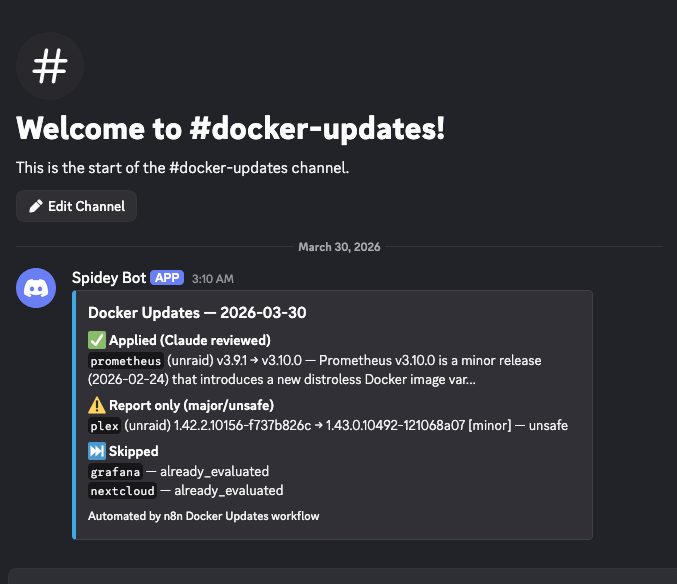
Now I wake up to a Discord message and an email telling me exactly what happened overnight:
- The Discord embed gives a quick summary—green checks for applied updates, red crosses for rejected ones, amber dots for things that need manual attention.
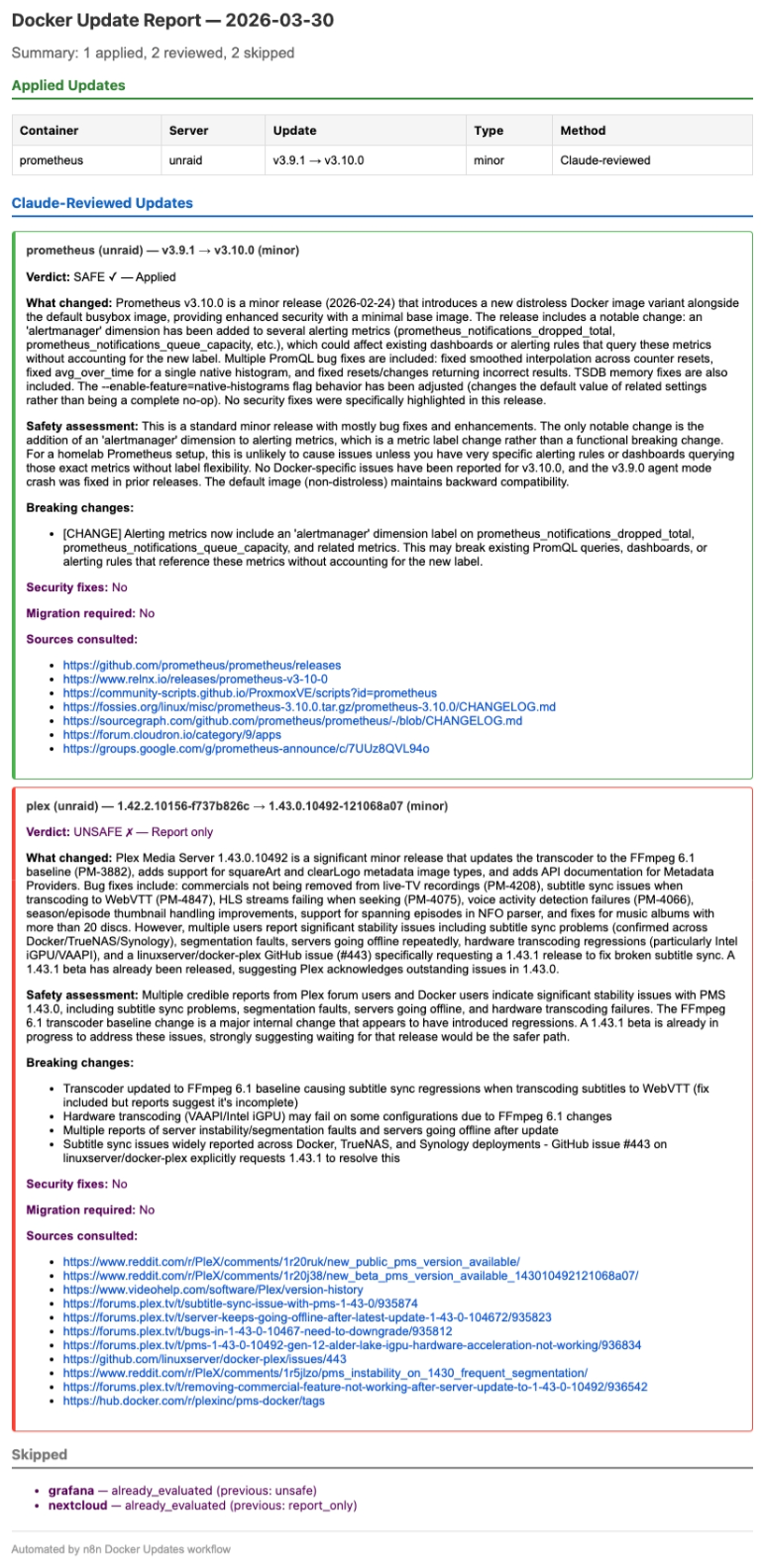
- The email report goes deeper: Claude's full reasoning for each decision, the sources it consulted, and whether it found breaking changes or security fixes.
Under the Hood: Stage by Stage
Let's walk through each stage of the pipeline.
Stage 1: Container Scanning
The pipeline starts by asking WUD to scan every container across both servers. WUD compares each container's running image tag against the latest available version in the registry. A call to POST wud:3000/api/containers/watch that returns ~60 container objects:
[
  {
    name: "grafana",
    image: "grafana/grafana",
    tag:   "12.3.3",
    result: {
      tag: "12.4.2",
      link: "https://github.com/grafana/grafana/releases"
    },
    updateAvailable: true,
    updateKind: { semverDiff: "minor" }
  },
  ...
]
On a typical week, 3–5 containers out of 60 have pending updates. The rest are either already current or use digest-only tracking (no semantic version to compare).
Stage 2: Classify and Route
This is where the pipeline decides what to do with each update. The classification logic parses version strings and applies a routing table:
for each container where updateAvailable == true:

    diff = container.updateKind.semverDiff

    if diff == "patch":           // e.g. 2.9.3 → 2.9.4
        action = "auto_apply"     // patches are safe -- apply immediately

    else if diff == "minor":      // e.g. 2.9.4 → 2.14.2
        action = "claude_review"  // needs research before applying

    else if diff == "major":      // e.g. 32.0.5 → 33.0.1
        action = "claude_review"  // needs research (never auto-applied)

    else:
        skip                      // non-semver, can't classify

    // Check Redis: already evaluated this exact version transition?
    key = "docker-updates:eval:${name}:${server}:${fromVersion}:${toVersion}"
    if redis.GET(key) exists:
        skip                      // handled in a previous run
Two design decisions to note here. First, the classification is conservative: only patches get auto-applied. Everything else goes through Claude. Second, the Redis-backed memory system ensures we don't re-evaluate the same version transition twice—if Claude said Plex 1.43.0 was unsafe on Monday, it won't waste time asking again on Tuesday.
Stage 3: The Per-Container Loop
Each container with a pending action enters a sequential processing loop. Before taking any action, the pipeline runs a health check:
for each container in actionQueue:

    // Best-effort health check via Docker socket
    health = GET dockersocket:2375/containers/{id}/json
                .State.Health.Status

    if health == "unhealthy":
        log("health_check_failed", container)
        continue                   // don't touch sick containers

    switch (action):

      case "auto_apply":
        result = POST wud/api/containers/{id}/triggers/
                      dockercompose/default
        log(result.ok ? "patch_applied" : "trigger_failed")

      case "claude_review":
        verdict = claudeAgent.review(container)
        //  verdict is one of: safe | unsafe | uncertain

        if verdict == "safe" AND diff != "major":
            POST wud/api/containers/{id}/triggers/...
            log("update_applied")
        else:
            log("update_rejected", verdict.reasoning)

    accumulate(container, outcome)
The health check is a safety net. If Nextcloud is already in a bad state, the last thing you want is to pile an update on top of it. Unhealthy containers get skipped and flagged for manual investigation.
When the pipeline triggers an update, it goes through WUD's Docker Compose integration, which runs docker compose down <service> && docker compose up -d <service> in the appropriate stack directory. This ensures the container gets a clean recreate with the new image.
WUD's Docker Compose trigger has the additional feature of updating the docker-compose.yml files with the new image version – so if for whatever reason I had to rebuild my compose stack, every container would be recreated with the right version.
One key policy I decided to apply: major version updates are never auto-applied, even if Claude says they're safe. They always go into “report only” mode. Major bumps are inherently risky, and I want to be the one pulling that trigger. You may decide to live a little more dangerously and let the workflow apply major version updates if Claude determines nothing will break.
Stage 4: The AI Safety Review
This is the part that makes the whole pipeline worthwhile. When a minor or major update is detected, the workflow hands it to a Claude AI Agent node configured with a web search tool.
Here's the agent's task (simplified):
SYSTEM PROMPT (simplified):

You are a Docker container update safety analyst for a
homelab running on Unraid.

Given:
  container: {name}
  current_version: {fromVersion}
  new_version: {toVersion}
  update_type: {minor|major}
  release_url: {link}

Research this update thoroughly:
  1. Read official release notes and changelogs
  2. Check GitHub issues for the new version
  3. Search community reports (Reddit, forums)
  4. Identify breaking changes and migration steps
  5. Note any security fixes

Return a structured JSON verdict:
{
  verdict: "safe" | "unsafe" | "uncertain",
  reasoning: "...",
  changelog_summary: "...",
  breaking_changes: [...],
  security_fixes: true | false,
  migration_required: true | false,
  sources_consulted: [...]
}
Claude doesn't just read the release notes. It actively searches the web using SearXNG—a self-hosted metasearch engine running on the same server. It checks GitHub issues, Reddit threads, application-specific forums, and Docker Hub comments. It cross-references what the release notes claim against what real users are experiencing.
The structured output schema is critical. A freeform “looks fine” wouldn't be useful for automated decision-making. The structured verdict feeds directly into the routing logic, while the human-readable reasoning goes into the email report for my review.
Stage 5: Accumulate and Report
After every container has been processed, the pipeline builds two reports and ships structured events to Loki.
Discord embed — A compact summary posted to #docker-updates. Each container gets a status line with its name, version transition, and outcome. Compact enough to glance at over morning coffee.
Email report — A detailed HTML email sent via Amazon SES. For every Claude-reviewed update, it includes the full reasoning, sources consulted, breaking changes found, and whether security fixes were present. This is my audit trail when deciding whether to manually apply a rejected update later.
Loki events — Every stage of the pipeline pushes structured JSON events to Loki. Scan results, health checks, Claude verdicts, applied updates, trigger failures—each one is a labeled log entry that feeds the Grafana dashboard.
The Memory System
Without the evaluation memory, the pipeline would re-evaluate the same update every night until it either gets applied or a newer version supersedes it. That means Claude would research Plex 1.43.0 every single day—burning API tokens and producing duplicate reports.
The solution uses Redis as an external key-value store. Before processing each container, the workflow checks Redis for a previous decision. After the run completes, all definitive outcomes are saved back:
// Redis key format
docker-updates:eval:{name}:{server}:{fromVersion}:{toVersion}

// Example keys and values:
GET docker-updates:eval:plex:unraid:1.42.2:1.43.0
  -> { "decision": "unsafe", "date": "2026-03-27", "newVersion": "1.43.0" }

GET docker-updates:eval:unpackerr:unraid:0.14.5:0.15.2
  -> { "decision": "applied", "date": "2026-03-27", "newVersion": "0.15.2" }

GET docker-updates:eval:grafana:unraid:12.3.3:12.4.2
  -> { "decision": "report_only", "date": "2026-03-27", "newVersion": "12.4.2" }

// Definitive outcomes are saved:
//   applied, auto_applied, report_only, unsafe

// Transient failures are NOT saved (retried next run):
//   trigger_failed, skipped_claude_error, skipped_unhealthy
Why Redis instead of n8n's built-in staticData? Redis gives us persistence that's independent of the workflow itself—if the workflow is redeployed, the memory survives. It also makes it easy to inspect and clear individual entries without touching the n8n UI.
The key includes both the source and destination versions, so when Plex releases 1.43.1, it becomes a brand new evaluation—the old "unsafe" verdict for 1.43.0 doesn't block it.
Transient failures—like a WUD trigger that timed out or a Claude review that hit its iteration limit—are deliberately not saved. They'll be retried automatically on the next run without any manual intervention.
When Claude Says No
The most interesting part of this pipeline is watching Claude make genuinely good judgment calls. Here are three real examples from recent runs.
Plex 1.42.2 → 1.43.0: Rejected
“Multiple credible reports from Plex forum users and Docker users indicate significant stability issues with PMS 1.43.0, including subtitle sync problems, segmentation faults, servers going offline, and hardware transcoding failures. The FFmpeg 6.1 transcoder baseline change is a major internal change that appears to have introduced regressions. A 1.43.1 beta is already in progress to address these issues, strongly suggesting waiting for that release would be the safer path.”
Claude found the Reddit threads, the Plex forum posts, and the GitHub issue on linuxserver/docker-plex. It didn't just read the release notes (which looked fine)—it found that real users were experiencing segfaults and subtitle sync failures. It even noted that a 1.43.1 beta was in progress, suggesting Plex themselves acknowledged the problems. Exactly the kind of nuance you'd want from a human reviewer.
Grafana 12.3.3 → 12.4.2: Rejected
“While the security fixes are critical and strongly recommended, the jump from 12.3.3 to 12.4.2 introduces several breaking changes including unified storage migration for playlists, automatic dashboard/folder migration to Unified Storage, and changed plugin environment variable behavior. For a homelab, the safer path would be to update to 12.3.6 (the security patch for the 12.3.x branch) to get the critical security fixes without the 12.4 breaking changes, then plan the 12.4 upgrade separately.”
This one impressed me. Claude didn't just flag the update as unsafe—it proposed an alternative strategy. Instead of jumping to 12.4.2, it recommended staying on the 12.3.x branch and applying 12.3.6 to get the critical CVE fixes without the breaking changes. That's exactly what I ended up doing.
n8n 2.9.4 → 2.14.2: Approved and Applied
“No breaking changes were found across any of the intermediate versions from 2.10 to 2.14. All releases in this range contain features and bug fixes without documented migration requirements. This update also includes a critical security patch (CVE-2026-33696 — RCE via prototype pollution) which makes upgrading strongly recommended.”
A five-minor-version jump that Claude reviewed across every intermediate release. It found no breaking changes and flagged a critical remote code execution vulnerability that made upgrading urgent. Applied automatically overnight.
Observability
Every meaningful event in the pipeline is pushed to Loki as a structured JSON log entry with consistent labels (service="n8n-docker-updates", event="<type>"). This feeds a dedicated Grafana dashboard:
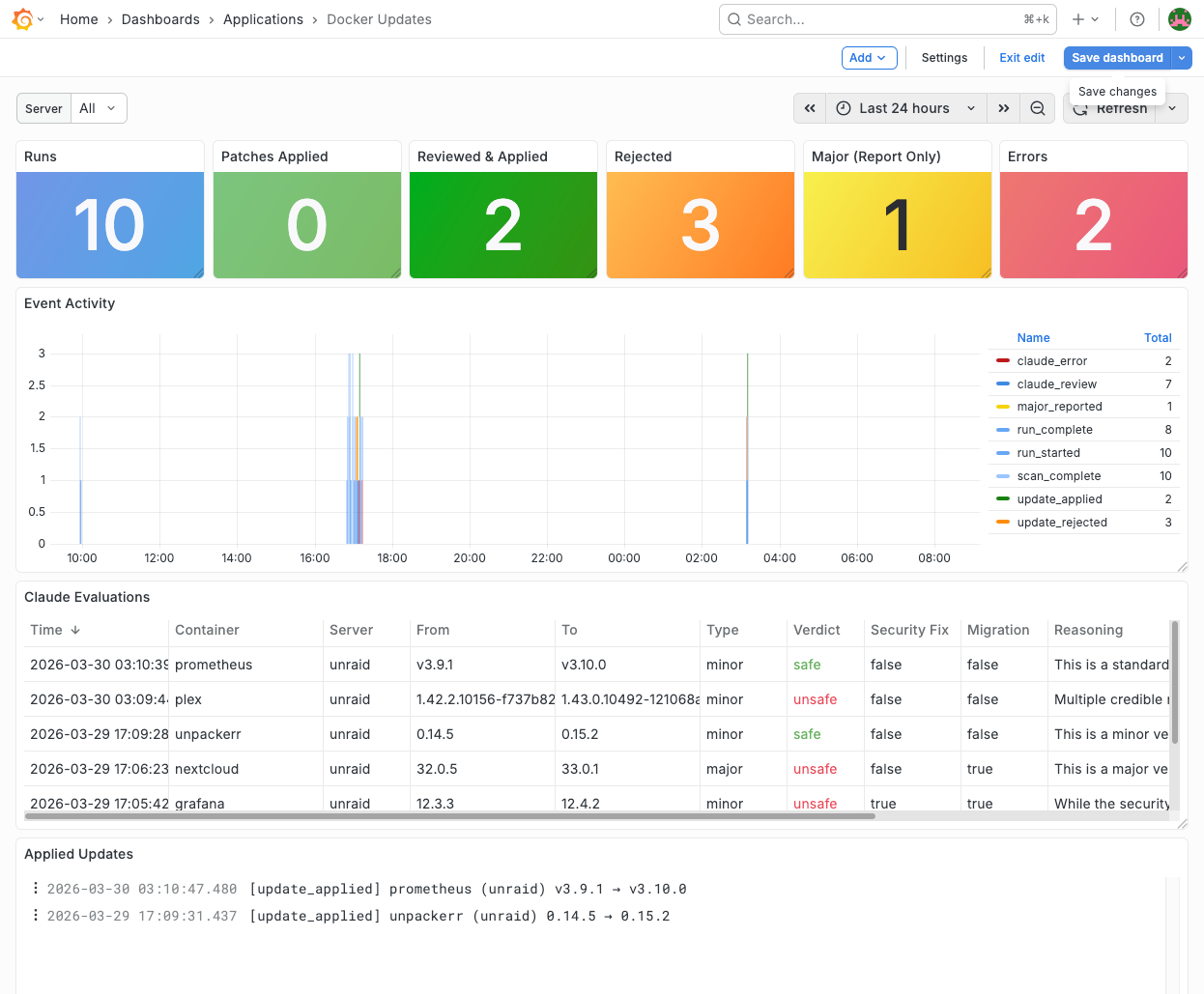
The dashboard has six sections:
- Stat panels — Total runs, patches applied, Claude-approved updates, rejections, and errors at a glance
- Event timeline — Stacked bars showing event types over time, making patterns visible
- Claude evaluations table — Every AI review with color-coded verdicts (green/red/amber), reasoning excerpts, and links to sources
- Applied updates log — What got updated, from which version to which
- Rejections & errors log — What was held back and why
- Full event stream — The raw firehose for debugging
The structured Loki events make ad-hoc investigation easy:
# All pipeline events
{service="n8n-docker-updates"}

# Just Claude's verdicts
{service="n8n-docker-updates", event="claude_review"} | json

# Rejected updates that had breaking changes
{service="n8n-docker-updates", event="update_rejected"} | json
  | breaking_changes != "[]"

# Run stats over time
{service="n8n-docker-updates", event="run_complete"} | json
  | applied_count, rejected_count, error_count
The Stack
For those curious about the specific tools:
- n8n — Workflow orchestration. Handles control flow, API calls, the AI Agent node, and the loop logic.
- What's Up Docker (WUD) — Container update detection. Watches Docker Compose files across both servers and compares running tags against registries.
- Claude (Anthropic API) — AI safety analysis via n8n's AI Agent node. Opus model with structured output parsing.
- SearXNG — Self-hosted metasearch engine. Gives Claude web search access without sending queries through third-party search engines.
- Loki + Grafana — Structured logging and dashboards for pipeline observability.
- Redis — Cross-run evaluation memory. Persists verdicts so the same update isn't re-evaluated nightly.
- Discord webhooks — Quick summary notifications to a dedicated channel.
- Amazon SES — Detailed HTML email reports.
Everything runs on the same Unraid server (except SES), orchestrated with Docker Compose. The entire pipeline is self-contained.
Was It Worth It?
More than I expected. The pipeline has been running nightly for several weeks, and the peace of mind is tangible. Patches get applied automatically, so security fixes land within 24 hours of release. Minor updates get researched thoroughly before touching a running container. And major updates get flagged with enough context that I can make an informed decision in minutes instead of hours.
The Plex example alone justified the effort. Without this pipeline, I probably would have blindly updated to 1.43.0 and spent an evening debugging subtitle sync issues and segfaults. Instead, Claude caught it, explained why, and noted that a fix was already in beta. I waited, 1.43.1 dropped, and the update went through cleanly.
If you run a homelab with more than a few containers, I'd encourage you to think about what your update strategy looks like. Falling behind on updates isn't just a missed-features problem — it's a security problem, especially for anything exposed to the public internet. And the reason most of us fall behind isn't laziness — it's that the process is tedious enough that we keep putting it off, and before long we're running containers with known CVEs. The whole point of automating this is to remove that friction so updates actually happen.