
Keeping Tabs on Claude Code's Context Window
Claude Code knows exactly how full its context window is — you just have to ask.

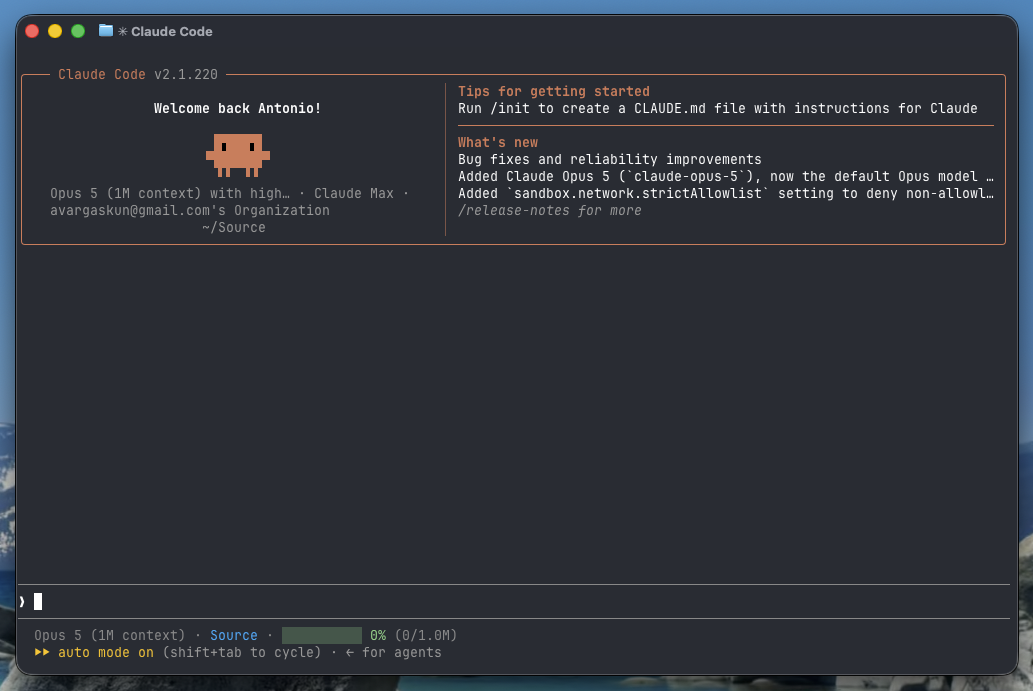
If you are a subscriber of this blog, chances are you use Claude Code regularly, either at work or for your own personal projects. I use it every day, in no small part to keep up with my self-host hobby. I've become pretty dependent on it, actually. Editing compose files, chasing a container that won't start, writing the little glue scripts that hold my Unraid setup together — it's genuinely good at the kind of fiddly work that used to eat an entire evening.
But there's a failure mode that kept showing up, and it was maddening. Deep into a debugging session — the model had read half a dozen config files and a wall of container logs — the context window would fill up. The conversation compacts, the assistant starts working from a summary, and its accuracy falls off a cliff: it trips on things we had flagged a few minutes earlier. Long-running prompts started giving me context-anxiety: fearing auto-compaction would kick in before I could do anything about it.
I finally decided to do something about it, and the fix turned out to be simpler than I expected. Claude Code lets you replace its status line with a script of your own — and it hands that script a JSON blob that already includes the context percentage, pre-computed. No parsing transcripts, no counting tokens. A few lines of bash later, I had a progress bar that updates as I work:
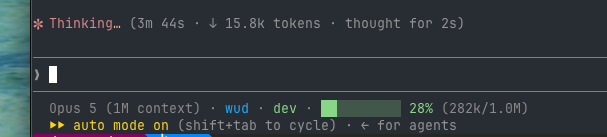
The example above is powered by a small bash script showing the model, the working directory, the git branch, and a ten-cell bar for the context window. Green under 60%, amber from 60%, red from 85% — the point where I should wrap up what I'm doing rather than start something new.
Have you tried using the Ralph-Wiggum loop as part of your daily flow? This is another way to optimize use of your agent's context window. I've written my own set of skills for claude-code based on the ideas behind Ralph-Wiggum. You may find it useful as-is or it may serve as inspiration if you prefer to create your own: https://github.com/avargaskun/ralph-loop
How does this work
Claude Code has a statusLine setting. You point it at a command, and every time the display needs refreshing it runs that command and pipes a JSON blob to its standard input. Whatever the command prints becomes your status line.
The useful part is what's in that JSON. Tracking context used to mean parsing the session transcript and estimating tokens yourself. Not anymore — there's a pre-computed percentage sitting right there:
{
  "session_id": "abc123...",
  "model": { "display_name": "Opus 5" },
  "workspace": {
    "current_dir": "/mnt/user/appdata/compose",
    "project_dir": "/mnt/user/appdata/compose"
  },
  "context_window": {
    "total_input_tokens": 124000,
    "context_window_size": 1000000,
    "used_percentage": 12.4,
    "remaining_percentage": 87.6
  },
  "cost": { "total_cost_usd": 0.01234 }
}
The field we want is context_window.used_percentage. Two things worth noting before we build on it:
- It can be
null. Early in a session, before the first API call, there's nothing to report. It also resets right after a/compact. So we need a fallback rather than printing the word "null" into your prompt. - It also gives you the window size.
context_window_sizetells you the actual size — 200,000 on most models, 1,000,000 if you're on a large-context one. You don't want to hard-code your solution to a fixed number, or you will get incorrect results if you switch the model you use. If you assume a window size of 200k, then a 1M-context session will report 62% use when it's really at 12%.
What You'll Need
- A working Claude Code install — the status line lives in
~/.claude/settings.json. jqfor reading the JSON. You almost certainly have it already; if not,brew install jqorapt install jq.- Optionally
git, if you want the branch name in the line.
Step-by-Step Guide
Step 1: Create the status line script
Save the following as ~/.claude/statusline.sh, then make it executable with chmod +x ~/.claude/statusline.sh.
#!/usr/bin/env bash
# Claude Code status line: model, cwd, git branch, context window usage.

set -uo pipefail

input=$(cat)

field() { printf '%s' "$input" | jq -r "$1 // empty" 2>/dev/null; }

model=$(field '.model.display_name')
dir=$(field '.workspace.current_dir // .cwd')
pct=$(field '.context_window.used_percentage')
used=$(field '.context_window.total_input_tokens')
size=$(field '.context_window.context_window_size')

if [ -z "$pct" ] && [ -n "$used" ] && [ -n "$size" ] && [ "$size" -gt 0 ] 2>/dev/null; then
	pct=$(awk -v u="$used" -v s="$size" 'BEGIN { printf "%.0f", (u / s) * 100 }')
fi

dim=$'\033[38;5;245m'
blue=$'\033[38;5;39m'
green=$'\033[38;5;114m'
reset=$'\033[0m'

human() {
	awk -v n="$1" 'BEGIN {
		if (n >= 1000000) printf "%.1fM", n / 1000000
		else if (n >= 1000) printf "%.0fk", n / 1000
		else printf "%d", n
	}'
}

out=""
[ -n "$model" ] && out+="${dim}${model}${reset}"

if [ -n "$dir" ]; then
	[ -n "$out" ] && out+="${dim} · ${reset}"
	out+="${blue}$(basename "$dir")${reset}"
	branch=$(git -C "$dir" --no-optional-locks branch --show-current 2>/dev/null)
	[ -n "$branch" ] && out+="${dim} · ${reset}${green}${branch}${reset}"
fi

if [ -n "$pct" ]; then
	rounded=$(awk -v p="$pct" 'BEGIN { printf "%.0f", p }')
	if [ "$rounded" -ge 85 ]; then
		ctx_color=$'\033[38;5;203m'
	elif [ "$rounded" -ge 60 ]; then
		ctx_color=$'\033[38;5;221m'
	else
		ctx_color=$'\033[38;5;114m'
	fi

	filled=$((rounded / 10))
	[ "$filled" -gt 10 ] && filled=10
	bar=""
	for ((i = 0; i < 10; i++)); do
		if [ "$i" -lt "$filled" ]; then bar+="█"; else bar+="░"; fi
	done

	detail=""
	if [ -n "$used" ] && [ -n "$size" ]; then
		detail=" ${dim}($(human "$used")/$(human "$size"))${reset}"
	fi

	[ -n "$out" ] && out+="${dim} · ${reset}"
	out+="${ctx_color}${bar} ${rounded}%${reset}${detail}"
else
	[ -n "$out" ] && out+="${dim} · ${reset}"
	out+="${dim}░░░░░░░░░░ —${reset}"
fi

printf '%s\n' "$out"
A few details that matter:
- The
field()helper appends// emptyto every jq expression, so a missing or null key becomes an empty string instead of the literal textnull. - The git lookup uses
--no-optional-locksso a status line refreshing on every message never fights with a git command you're running in the same repository. - Every path through the script prints something — a malformed payload gets you a dim placeholder bar instead of a shell error smeared across your terminal.
Step 2: Turn it on in settings.json
Add the statusLine block to ~/.claude/settings.json, merging it with whatever is already in there:
{
  "statusLine": {
    "type": "command",
    "command": "bash '/Users/you/.claude/statusline.sh'",
    "padding": 0
  }
}
Claude Code picks up the change on its own; if the line doesn't appear, restarting the session will do it.
The command runs when a new message arrives, after a compact, and when you change permission or vim modes. There's also a refreshInterval option that re-runs it every N seconds. I deliberately left it off — nothing in this line changes on a timer, so a periodic subprocess would be pure waste. If you add something time-based, like a clock or a cost counter, turn it on.
Step 3: Verify it
You don't have to burn a real session to test this. The script reads JSON on stdin, so you can just hand it some:
echo '{"model":{"display_name":"Opus 5"},
  "cwd":"/tmp",
  "context_window":{"total_input_tokens":128000,
                    "context_window_size":200000,
                    "used_percentage":64}}' | ~/.claude/statusline.sh
You should get an amber bar reading 64%. It's worth also piping it echo '{}' — an empty object — to confirm you get the dim placeholder rather than an error.
Why include the folder and branch?
I run Claude Code inside tmux, usually several instances at once — one pane working through a compose change, another reading logs on the backup server, a third parked in a git worktree on a branch that isn't ready to merge. They all look identical. Every one of them is a dark terminal with a prompt in it.
Putting the directory name and the current branch in each instance's status line means every pane labels itself. When I flip back to a window after twenty minutes somewhere else, I don't have to run pwd and git branch to work out which task I'm looking at — and I'm far less likely to type the right command into the wrong pane. For multi-instance work that turns out to matter about as much as the context bar does.
What's Next?
This is a small script, and there's plenty of room to make it yours:
- Add the session cost. The same JSON carries
cost.total_cost_usd, if you'd like a running total of what the session has spent. - Tune the thresholds. I switch to amber at 60% and red at 85%. If you work in long sessions and compact deliberately, you might want the warning earlier.
- Push it out to tmux. This is the one I'm building now. The status line command inherits the environment of the Claude process,
$TMUX_PANEincluded, so the script can write its percentage to a file keyed by pane ID and let a tmux-powerline segment read it back — giving you context usage for the focused pane, and nothing at all when that pane isn't running Claude. Stay tuned — if it turns out well, I'll post about it next.